Deferred Compensation 457 Login in 2026: How to Access Your Account and Fix Common Problems
Quick Answer
- You log in to your 457 deferred compensation plan through your employer’s plan-specific website, not a single universal portal.
- Your login URL depends on your plan provider: Voya, Empower, Corebridge Financial, or MassMutual handle most government 457(b) accounts.
- If you forgot your password, use the “Forgot Password” link on the login page or call your plan’s participant service line.
How Do You Log In to Your Deferred Compensation 457 Account?
You log in to your deferred compensation 457 account through the secure website your employer or plan provider assigned to your specific plan. There is no single nationwide login page for 457(b) accounts.
Each government employer contracts with a record keeper. That record keeper runs the participant website. Your login credentials work only on that plan’s website.
Common plan providers and their login patterns:
| Provider | Typical Login URL Pattern |
|---|---|
| Voya | [plan].voya.com |
| Empower | empower.com (participant login) |
| Corebridge Financial | [plan].corebridgefinancial.com |
| MassMutual | MassMutual.com/[plan] |
For example, CalPERS 457 Plan participants log in through the Voya-managed portal at calpers457.com . State of Michigan 401(k) and 457 Plan participants log in at stateofmi.voya.com . Commonwealth of Virginia 457 Plan participants log in at dcp.varetire.org/login .
Your employer’s HR department or benefits office can tell you the exact URL for your plan.
What Is the 457 Deferred Compensation Login for Voya Plans?
The Voya 457 deferred compensation login is at your plan-specific Voya website, which typically follows the pattern of your employer’s name or plan abbreviation followed by .voya.com. Voya is one of the largest record keepers for government 457(b) plans.
Voya manages several high-profile plans. CalPERS contracts with Voya as third-party administrator for the CalPERS 457 Plan . The State of Michigan 401(k) and 457 Plans use Voya . The Commonwealth of Virginia 457 Deferred Compensation Plan transferred to Voya on January 1, 2025 .
To log in to a Voya-administered 457 plan:
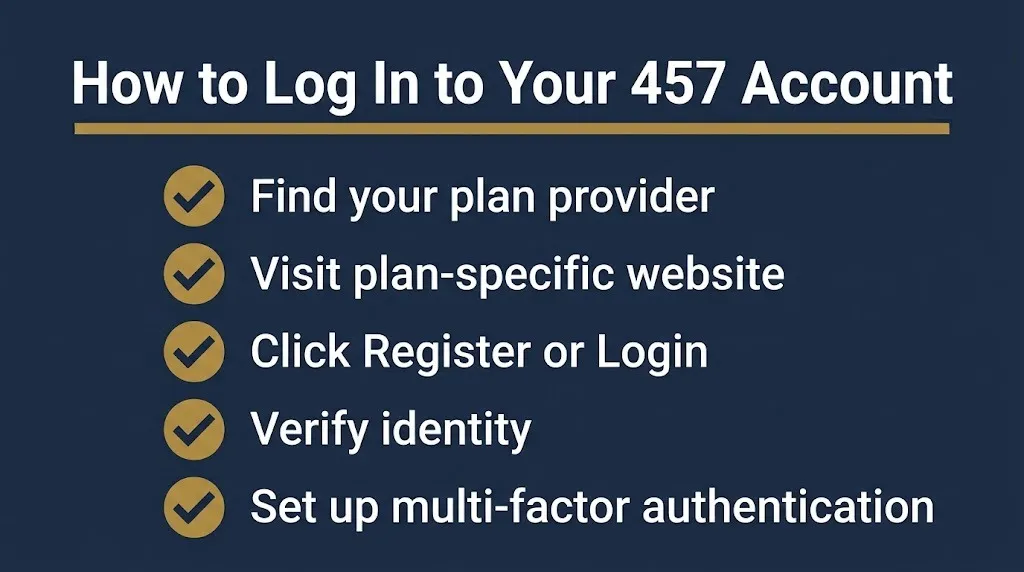
- Go to your plan’s Voya website.
- Enter your username and password.
- If you are a first-time user, select “Register” or “Create Account.”
- Complete identity verification using your email or phone number.
- Set up multi-factor authentication if prompted.
Voya requires a PIN for first-time registration on some plans. New hires who did not have an online account with the previous record keeper receive a PIN by U.S. mail .
If you forgot your Voya password, select “Forgot Password” on the login page and follow the verification steps.
What Is the 457 Deferred Compensation Login for Empower Plans?
The Empower 457 deferred compensation login is through empower.com, where you select “Participant Login” and enter your credentials. Empower is the second-largest retirement services provider in the country and administers 457 plans for numerous state and local governments.
Empower administers the Nassau County 457 deferred compensation plan for approximately 11,500 employees with $2 billion in assets . The State of Louisiana renewed its 35-year partnership with Empower in April 2026, covering approximately 36,000 state and local employees with $2.58 billion in assets . The State of New Hampshire renewed with Empower in 2025 for approximately 8,600 public service workers with $564 million in assets .
To log in to an Empower-administered 457 plan:
- Go to empower.com.
- Click “Login” in the top navigation.
- Select “Retirement Plan Participants.”
- Enter your username and password.
- Use the “Forgot Username or Password” link if needed.
Empower also offers a mobile app for account access.
What Is the 457 Deferred Compensation Login for Corebridge Financial Plans?
The Corebridge Financial 457 deferred compensation login is at your plan-specific Corebridge website, typically formatted as [planname].corebridgefinancial.com. Corebridge Financial was formerly known as VALIC and AIG Retirement Services.
Corebridge administers 457 plans for the Erie County 457(b) Deferred Compensation Plan in New York , the Metropolitan Water Reclamation District of Greater Chicago , the State of Maine 457(b) Deferred Compensation Plan , and Broward Health .
To log in to a Corebridge-administered plan:
- Go to your plan’s Corebridge website.
- Select “Register” if you are a new user.
- Enter your personal information and plan access code if required.
- Create your username and password.
- Log in to manage contributions, investments, and beneficiaries.
For Erie County participants, the plan website is eriecounty.corebridgefinancial.com, and the phone number is 1-866-457-ERIE (3743) . Broward Health participants log in at bh.corebridgefinancial.com .
What If You Forgot Your 457 Deferred Compensation Password or PIN?
If you forgot your 457 deferred compensation password or PIN, use the “Forgot Password” link on your plan’s login page or call your plan’s participant service line. Most providers offer self-service password reset.
For Voya-administered plans like the State of Michigan 401(k) and 457 Plans:
- Forgot your PIN: Call the Plan Information Line at 800-748-6128. You will verify your date of birth and name .
- Forgot your password: Select “Forgot Password,” enter your username and date of birth, and receive a verification code by email or phone .
For CalPERS 457 Plan participants, call the CalPERS Information Line at 1-800-260-0659. Participant Service Representatives are available Monday through Friday, 6:00 AM to 5:00 PM Pacific Time .
For Voya DCP accounts (including Virginia), call 877-327-5261 .
For MassMutual plans, call the Participant Information Center at 1-800-743-5274 .
Your account numbers, PIN, password, and security questions are the keys to your retirement savings. Do not share them with anyone.
Reality Check: No legitimate 457 plan provider texts or emails you asking for your login credentials, Social Security number, or password. If you receive a message demanding urgent action or payment to “unlock” your retirement account, it is a phishing scam. Always log in by typing your plan’s website address directly into your browser, never through a link in an unsolicited message.
What Is the 2026 Contribution Limit for 457(b) Plans?
The 2026 contribution limit for 457(b) plans is $24,500, an increase of $1,000 from 2025. The IRS sets this limit annually and adjusts it for inflation.
If you are age 50 or older, you may be able to contribute an additional $8,000 catch-up contribution in 2026 . If you are between ages 60 and 63, you may be able to contribute an additional $11,250 .
There is also a special 457 catch-up provision. If you undercontributed in prior years and are within the last three taxable years before reaching your plan’s normal retirement age, you may be able to contribute up to twice the annual limit (up to $49,000 in 2026) .
You cannot combine the age 50+ catch-up with the special 457 catch-up in the same year. You may contribute up to the higher amount .
| Contribution Type | 2026 Limit |
|---|---|
| Standard contribution | $24,500 |
| Age 50+ catch-up | +$8,000 |
| Age 60-63 catch-up | +$11,250 |
| Special 457 catch-up | Up to $49,000 total |
Key Takeaway: The 2026 457(b) contribution limit is $24,500, with catch-up options that can push your total deferral to $49,000 if you qualify for the special three-year catch-up.
What Should You Do If Your 457 Login Is Not Working?
If your 457 login is not working, the most common causes are forgotten credentials, account lockouts, browser issues, or a recent plan provider transition. Here is a troubleshooting checklist:
- Verify you are on the correct website. Type the URL directly instead of using a saved bookmark.
- Try the “Forgot Password” link. Most providers send a reset code by email or text.
- Clear your browser cache and cookies. Stale data can block login pages.
- Try a different browser or device. Some older browsers do not support current security protocols.
- Check for a recent plan transition. Record keeper changes require new account registration.
- Call your plan’s participant service line. Representatives can unlock accounts and verify identity.
Plan transitions are a common cause of login problems. When the Commonwealth of Virginia moved its 457 plan from MissionSquare Retirement to Voya on January 1, 2025, participants had to set up new online accounts. Employees who had an online account with MissionSquare did not need a PIN, but new hires received one by mail .
What Happens Next for 457 Plan Account Access in 2026
Here is the expected timeline for 457 plan access changes and contribution limits:
January 2026: New contribution limits took effect. The standard 457(b) limit is $24,500.
Ongoing 2026: Plan providers continue enhancing login security with multi-factor authentication and identity verification.
Late 2026: Watch for IRS announcements about 2027 contribution limits, typically released in October or November.
January 2027: New contribution limits take effect for the 2027 tax year.
Frequently Asked Questions
How do I log in to my 457 deferred compensation account?
Log in through your plan-specific website provided by your employer’s record keeper. Common providers include Voya, Empower, Corebridge Financial, and MassMutual. Check with your HR department for your exact URL.
What is the 2026 457(b) contribution limit?
The standard limit is $24,500 for 2026. If you are age 50 or older, you may add $8,000. If you are 60-63, you may add $11,250.
How do I reset my 457 plan password?
Use the “Forgot Password” link on your plan’s login page. You will verify your identity through email or phone and create a new password. You can also call your plan’s service line for help.
What if I forgot my Voya 457 PIN?
Call the Plan Information Line for your specific plan. For State of Michigan plans, call 800-748-6128 and verify your date of birth and name.
Can I access my 457 account on my phone?
Yes. Most providers offer mobile apps. Voya has the Voya Retire app. Corebridge Financial has a mobile app. Empower also offers mobile access.
Why can’t I log in to my 457 account?
Common causes include forgotten credentials, browser issues, account lockouts, or a recent plan provider transition. Try resetting your password or call your plan’s service line.
Is there a single 457 login website for all plans?
No. Each employer’s plan has its own login website. The URL depends on the record keeper your employer selected.
What is a 457 plan and how does it work?
A 457(b) plan is a tax-advantaged deferred compensation plan for government and some nonprofit employees. Contributions are deducted from your paycheck, and you choose investments. Withdrawals are taxed as income in retirement.
Find Your Plan’s Login Page and Check Your Contribution Limit
Your 457 deferred compensation account is one of your most valuable retirement tools. The 2026 contribution limit is $24,500, and you can add catch-up contributions if you qualify.
Log in to your account this week to verify your beneficiaries and contribution rate. If you cannot find your login page, call your HR department or your plan provider’s participant service line. Do not wait until the end of the year to make changes.