Litigation Hold: What It Means and How to Set One Up in Office 365 (2026)
Quick Answer
- A litigation hold is a real legal obligation, not optional guidance, and courts can sanction you for ignoring it under FRCP 37(e).
- There’s no dollar payout tied to a litigation hold; instead, noncompliance risks range from monetary sanctions to adverse jury instructions or dismissal.
- The duty to preserve begins the moment litigation is “reasonably anticipated,” which is often well before a lawsuit is actually filed.
If you’ve been told to place a “litigation hold” on your company’s data, here’s the direct answer: it’s a legal requirement to stop deleting anything that could be relevant to a lawsuit, and it starts earlier than most people expect.
This affects anyone managing email, Teams chats, or shared files once a dispute becomes foreseeable, not just after a complaint lands. The single most important fact to understand is timing: courts have held that the duty to preserve can begin before a lawsuit is even filed, the moment a party reasonably anticipates litigation.
This article covers what a litigation hold legally requires, what happens if you ignore one, and how to actually implement one in Microsoft 365, since that’s where most companies now store the emails and files courts expect them to preserve. One detail that surprises people: Microsoft retired its old “In-Place Hold” feature and replaced it with the current eDiscovery hold system.
The Facts
| Category | Detail |
|---|---|
| Legal Basis | Federal Rule of Civil Procedure 37(e), amended 2015 |
| Trigger Standard | Duty to preserve arises when litigation is “reasonably anticipated” |
| Leading Case | Zubulake v. UBS Warburg, 220 F.R.D. 212 (S.D.N.Y. 2003) |
| Severe Sanctions Standard | Adverse inference instructions require proof of “intent to deprive” (2015 amendment) |
| Available Remedies | Monetary sanctions, evidence preclusion, adverse inference instruction, dismissal or default judgment |
| Microsoft 365 Tool | Litigation Hold (Exchange Online) and eDiscovery hold in Microsoft Purview |
| License Needed | Exchange Online Plan 2, or Microsoft 365 E3/E5 for full eDiscovery capability |
| Old Feature Retired | In-Place Hold, replaced by the current Microsoft Purview eDiscovery hold system |
What Is a Litigation Hold?
A litigation hold is a directive to preserve all documents, emails, and data relevant to a lawsuit that’s pending or reasonably expected. It suspends your organization’s normal document retention and deletion schedules.
Courts also call this a “legal hold.” The concept has existed for decades, but it became formalized for electronic evidence through a series of federal court rulings starting in the early 2000s.
Think of it like a librarian who hears a credible rumor a historian is coming to research a specific event. Normal cleanup routines get paused for anything related to that topic, because destroying it now wouldn’t just be housekeeping, it would be destroying evidence.
Key Takeaway: A litigation hold overrides your normal data deletion schedule the moment litigation becomes reasonably foreseeable, not just after a lawsuit is formally filed.
Is a Litigation Hold Legally Required?
Yes, once litigation is “reasonably anticipated,” preserving relevant evidence becomes a legal duty, not a best practice. This obligation applies to both the party bringing a claim and the party facing one.
Federal Rule of Civil Procedure 37(e) requires parties to take reasonable, good-faith steps to preserve electronically stored information (ESI) once that duty attaches. Courts examine whether a “reasonable party, under similar conditions, would have anticipated litigation” based on the full circumstances.
Common triggers that create this duty include:
- Receiving a demand letter or preservation letter from an opposing party
- Getting notice of a regulatory investigation or government inquiry
- A serious workplace incident where legal action is foreseeable
- Internal decisions to initiate a lawsuit, even before filing
Not every vague complaint triggers the duty. Courts have found that “industrywide events” alone, or “equivocal letters” about a dispute, are not enough to start the clock without something more specific and credible.
What Happens If You Ignore a Litigation Hold?
Ignoring a litigation hold can result in court sanctions ranging from monetary penalties to case-ending dismissal, depending on what was lost and why. This is where the legal risk becomes concrete and expensive.
FRCP 37(e) sets up a tiered system. If evidence is lost through simple negligence, courts can order measures “no greater than necessary to cure the prejudice,” such as allowing the other side to present secondary evidence about what was lost.
If a court finds a party acted with intent to deprive the other side of evidence, far harsher remedies become available:
| Sanction Type | What It Means |
|---|---|
| Monetary sanctions | Court orders payment of the other side’s related legal fees |
| Evidentiary exclusion | Party barred from using certain evidence or arguments |
| Adverse inference instruction | Jury told it may assume the lost evidence was unfavorable to the spoliating party |
| Dismissal or default judgment | Case thrown out, or judgment automatically entered against the party |
Not yet determined applies here in a specific way: whether any of these sanctions would apply to your situation depends entirely on the facts of your case and is not something this article, or any general guide, can predict.
What Counts as Spoliation of Evidence?
Spoliation is the destruction, alteration, or failure to preserve evidence that’s relevant to litigation once the duty to preserve has attached. It’s the legal term courts use when a litigation hold failed or was never issued.
The 2015 amendment to FRCP 37(e) raised the bar for the most severe sanctions. Before 2015, showing a party acted negligently was often enough to justify an adverse inference instruction. Now, courts generally require clear and convincing evidence of intent to deprive the other side of that evidence before imposing the harshest remedies.
Recent circuit court decisions have reinforced this higher bar. In February 2025, the Second Circuit affirmed that specific intent is required under Rule 37(e)(2), joining what one legal analysis called an “emerging consensus across the circuits.”
Key Takeaway: Losing evidence by accident or through routine, good-faith processes is treated far less harshly than losing it after a court finds you intended to hide it from the other side.
How to Issue a Litigation Hold Notice
A litigation hold notice is a written communication instructing employees to preserve specific categories of information related to a legal matter. Getting this document right is the single most important step in the process.
- Identify the scope of the dispute and which company records are likely relevant.
- Name the specific “custodians,” meaning employees who may hold relevant information.
- Describe the categories of evidence to preserve: emails, documents, texts, video, database records.
- Instruct recipients to suspend any routine auto-deletion settings tied to that data.
- Set a process for periodically reissuing the hold as the matter develops.
- Expand the custodian list if discovery reveals additional relevant employees.
- Document that the notice was sent and acknowledged, since courts scrutinize this later.
- Lift the hold formally, in writing, only once the matter is fully resolved.
Courts have sanctioned parties for hold notices that were too narrow, never reissued, or not actually enforced after being sent. A hold that exists only on paper doesn’t satisfy the legal duty.
How to Set Up a Litigation Hold in Office 365
Setting up a litigation hold in Office 365 means enabling the built-in preservation feature on specific mailboxes through the Microsoft 365 admin center or Exchange Online. This preserves mailbox content even when a user tries to delete it.
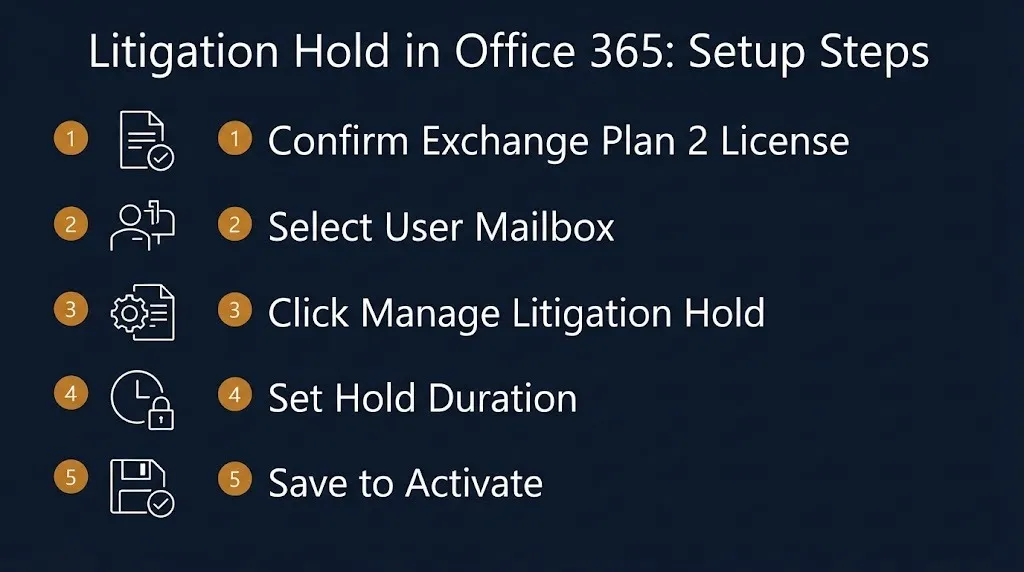
- Confirm the target mailbox has at least an Exchange Online Plan 2 license, or an equivalent add-on.
- Go to your organization’s admin dashboard and select the user mailbox to place on hold.
- Click “Manage Litigation Hold” on that user’s profile.
- Set the hold duration, or leave it indefinite until manually released.
- Confirm any custodian notification settings you want to send.
- Save the hold; it takes effect immediately once applied.
- For broader eDiscovery needs (Teams, OneDrive, Groups), use Core eDiscovery in Microsoft Purview instead, which requires an E3 plan or higher.
Once active, a litigation hold changes how deleted items behave. When a user deletes an email, Exchange intercepts the permanent deletion and routes it into the hidden Recoverable Items folder, where eDiscovery managers can still retrieve it.
Key Takeaway: A litigation hold in Office 365 preserves all mailbox content automatically, while a separate eDiscovery hold lets you apply more targeted, query-based preservation instead.
What Licenses Does Office 365 Litigation Hold Require in 2026?
A basic litigation hold on an individual mailbox requires at least an Exchange Online Plan 2 license or an equivalent add-on. Broader eDiscovery functionality across Teams and OneDrive requires a higher-tier plan.
| Feature | Minimum License Required |
|---|---|
| Basic mailbox litigation hold | Exchange Online Plan 2, or add-on |
| Core eDiscovery (Teams, OneDrive, Groups) | Microsoft 365 E3 or equivalent |
| Advanced eDiscovery (reminders, dashboards, analytics) | Microsoft 365 E5, or add-on |
Organizations on lower-tier plans like Exchange Plan 1 can still access some preservation features by purchasing the appropriate add-on licenses, without needing a full platform upgrade.
What’s the Difference Between a Litigation Hold and an eDiscovery Hold in Microsoft 365?
A litigation hold preserves all content in a mailbox indefinitely, while an eDiscovery hold can be limited to specific content matching a search query, like a date range or keyword. Both prevent permanent deletion, but they work differently.
- A litigation hold applies broadly to an entire mailbox, including modified and deleted items.
- An eDiscovery hold, managed through Microsoft Purview, allows conditional holds based on query, date, or custodian.
- Microsoft’s older “In-Place Hold” feature, which also allowed query-based holds, has since been retired in favor of the current eDiscovery hold system.
- Both hold types keep preserved content in the hidden Recoverable Items folder, invisible to the end user but retrievable by an eDiscovery manager.
Reality Check: Applying an Office 365 litigation hold does not itself notify your legal opponent, satisfy a court’s evidence requirements alone, or replace a written litigation hold notice to employees. It’s a technical preservation tool, not a substitute for the legal notice process.
How Do You Lift or Release a Litigation Hold?
You release a litigation hold once the litigation or investigation it was tied to is fully resolved, and it should be done formally and in writing. Simply forgetting about an old hold isn’t the same as properly closing it out.
In Microsoft 365, administrators can turn off a mailbox’s litigation hold through the same admin panel used to enable it, once legal confirms the matter is closed. On the legal side, best practice calls for issuing a formal release notice to all custodians who received the original hold, documenting the date and the reason for release.
Failing to release a hold properly isn’t typically sanctionable on its own, but skipping documentation can create confusion in future disputes about what was preserved and why.
When Does the Duty to Preserve Evidence Actually Begin?
The duty to preserve evidence begins when litigation becomes “reasonably anticipated,” which is a fact-specific standard courts apply case by case. This is almost always earlier than the date a lawsuit is officially filed.
Courts generally find the duty is triggered when a party:
- Knows or should know evidence is relevant to future or current litigation
- Is on notice of a credible probability of litigation
- Is genuinely contemplating filing a lawsuit or arbitration
- Takes affirmative steps to actually commence litigation
The obligation applies equally to the party preparing to sue and the party being sued. A company planning to bring a claim must start preserving relevant evidence before it even files, not just after.
Key Takeaway: Waiting for the process server before you start preserving evidence is a common and costly mistake; the legal duty usually starts well before that.
What Is Zubulake v. UBS Warburg and Why Does It Matter?
Zubulake v. UBS Warburg is the landmark 2003 federal case that established the modern standard for litigation holds involving electronic evidence. Judge Shira Scheindlin’s ruling remains the foundational reference point courts cite today.
The decision established that once a party reasonably anticipates litigation, it must suspend its routine document retention and destruction policy and put a formal litigation hold in place. This ruling predates the 2015 amendment to FRCP 37(e) but laid the groundwork that later rule change built on.
Courts and legal commentators still cite Zubulake as the baseline explanation for why the preservation duty exists and when it starts.
Who Receives a Litigation Hold Notice?
A litigation hold notice goes to any employee, called a “custodian,” who may possess information relevant to the anticipated or pending dispute. This isn’t limited to executives or the people directly involved in the underlying incident.
Custodians commonly include:
- Employees who worked directly on the project, transaction, or incident in question
- Managers or supervisors who oversaw the relevant work
- IT staff who manage systems where relevant data is stored
- Anyone named or referenced in early complaint drafts or demand letters
As the matter progresses through discovery, the custodian list often expands. Courts expect legal teams to reissue and broaden holds if new relevant employees are identified later.
Litigation Hold vs Standard Document Retention Policy: What’s the Difference?
A standard document retention policy governs routine, ongoing data lifecycle management, while a litigation hold is a temporary, matter-specific override triggered by anticipated litigation. The two serve fundamentally different purposes.
Retention policies and retention labels in Microsoft 365 are designed for long-term compliance goals, like meeting industry recordkeeping requirements, not for a specific lawsuit. A litigation hold, by contrast, is meant for a limited time period, focused narrowly on preserving data relevant to one particular legal matter.
When a litigation hold is active, it overrides any conflicting auto-deletion rule from your standard retention policy for the affected data, for as long as the hold remains in place.
How Long Does a Litigation Hold Last?
A litigation hold lasts as long as the underlying litigation or reasonably anticipated dispute remains active, and it has no fixed statutory expiration date. In Microsoft 365, administrators can set a hold to run indefinitely or for a defined duration, but the legal duty itself governs when release is actually appropriate.
Best practice calls for periodically reviewing active holds rather than setting them once and forgetting them. Courts have criticized organizations for holds that were technically active but never reissued or expanded as a case evolved, which can look like a failure to actually manage preservation in good faith.
What Happens Next
Ongoing: Circuit courts continue refining the “intent to deprive” standard under FRCP 37(e)(2), with the Second Circuit’s February 2025 ruling reflecting a broader trend toward requiring specific intent for severe sanctions.
Expected ongoing through 2026 and beyond: Microsoft continues expanding Purview eDiscovery capabilities, with advanced features like automated hold triggers and reminder dashboards increasingly tied to higher-tier E5 licensing.
As disputes arise: Organizations should expect to issue, monitor, and eventually release litigation holds on a rolling basis as new matters become reasonably anticipated and older ones resolve.
Frequently Asked Questions
What triggers the duty to preserve evidence?
Litigation being “reasonably anticipated” triggers the duty, which is often before a lawsuit is formally filed.
Common triggers include demand letters, regulatory notices, or internal decisions to sue.
Vague rumors or industrywide events alone generally aren’t enough to trigger the duty.
What happens if a company fails to issue a litigation hold?
Courts can impose sanctions ranging from monetary penalties to case-ending dismissal, depending on the circumstances.
The severity depends on whether the loss was negligent or done with intent to deprive the other side.
Since the 2015 FRCP 37(e) amendment, the harshest sanctions generally require proof of intent.
Can you put a litigation hold on Teams and OneDrive, not just email?
Yes, Microsoft 365’s Core eDiscovery features extend holds to Teams, OneDrive, and Office 365 Groups.
This requires at least an E3 plan or equivalent add-on license.
Basic mailbox-only holds require a lower Exchange Online Plan 2 license instead.
How is a litigation hold different from an eDiscovery hold in Microsoft 365?
A litigation hold preserves an entire mailbox indefinitely, including deleted or modified items.
An eDiscovery hold can be narrowed to specific content using a query, date range, or custodian filter.
Both prevent permanent deletion but differ in scope and precision.
Does a litigation hold delete or hide data from users?
No, it prevents permanent deletion while keeping the interface experience largely normal for the user.
Deleted items get intercepted and routed to a hidden Recoverable Items folder instead of being purged.
Only eDiscovery managers with proper permissions can search and retrieve that hidden content.
Who is responsible for issuing a litigation hold at a company?
Typically, in-house legal counsel or outside litigation counsel issues the formal hold notice.
IT administrators then implement the technical preservation, such as enabling Office 365 litigation hold settings.
Both roles need to coordinate, since a notice without technical enforcement doesn’t fully satisfy the legal duty.
How long should a litigation hold stay in place?
It should remain active for as long as the underlying dispute is pending or reasonably anticipated.
There’s no fixed expiration date; release should be a documented, deliberate legal decision.
Holds should be periodically reviewed and reissued if the scope of the matter changes.
Check with your organization’s legal counsel before releasing any active litigation hold, and confirm your Microsoft 365 licensing supports the preservation scope your matter actually requires. The standard to remember: the duty to preserve begins the moment litigation is reasonably anticipated, not when the complaint is filed.