Litigation Management Software in 2026: What Law Firms and Legal Teams Actually Need
Quick Answer
- Litigation management software helps law firms and legal teams track cases, deadlines, documents, and billing in one system.
- Pricing in 2026 typically ranges from $50 to $150 per user per month, with enterprise platforms costing far more.
- The biggest buying mistake is paying for features you will never use, especially AI tools that sound better than they work.
If you searched “litigation management software” or “litigation software,” you are probably a lawyer, paralegal, law firm administrator, or legal operations professional trying to choose a system. This article gives you the verified landscape for 2026, what the major platforms actually do, what they cost, and how to avoid the trap of buying a platform that looks impressive in a demo and then sits unused.
The market has shifted hard toward cloud-based platforms. On-premise systems are fading. Artificial intelligence features are everywhere, but their quality varies wildly. Some genuinely save time. Others are marketing language wrapped around basic search functions.
The surprising verified detail: many law firms buy litigation software and then use only 20 to 30 percent of its features. The gap between what the software does and what firms actually use is the hidden cost nobody puts on the invoice.
The Facts
| Fact | Detail |
|---|---|
| Market status | Cloud-based platforms dominate; AI features expanding |
| Typical pricing | $50 to $150 per user per month for mid-market platforms |
| Enterprise pricing | $500 to $2,000+ per user per month for full suites |
| Key features | Case management, calendaring, document management, e-discovery, billing |
| AI capabilities | Document review, legal research, deadline prediction, contract analysis |
| Integration needs | Email, document storage, accounting, court filing systems |
| Common failure point | Low feature adoption, not poor software quality |
Is Litigation Management Software Worth the Cost in 2026?
Litigation management software is worth the cost if your firm handles more than a handful of active cases and you actually use the features you pay for. The break-even point is lower than most firms think.
A solo practitioner with ten active cases may not need a full platform. A firm with five lawyers, two paralegals, and a hundred active cases almost certainly does. The software replaces the whiteboard, the spreadsheet, the paper calendar, and the shared drive with one system.
The real question is whether the firm will adopt it. Software that nobody uses is worse than no software. It costs money, creates confusion, and gives a false sense of organization.
Before buying, audit how your firm currently tracks cases. If the answer is email, memory, and a shared folder that nobody updates, a litigation platform will help, but only if someone enforces its use.
Key Takeaway: The software is worth it when case volume justifies the cost and the firm commits to using it. Without adoption, it is just another subscription.
How Much Does Litigation Management Software Cost in 2026?
Pricing in 2026 varies by platform, firm size, and feature set. The table below shows typical ranges based on current market data and vendor pricing pages.
| Platform Tier | Typical Monthly Cost Per User | Best For |
|---|---|---|
| Entry-level | $40 to $75 | Solo practitioners, small firms |
| Mid-market | $75 to $150 | Firms with 5 to 50 lawyers |
| Enterprise | $150 to $500 | Large firms, corporate legal departments |
| Full suite with AI | $500 to $2,000+ | AmLaw 200 firms, complex litigation groups |
Most platforms charge per user per month. Some charge per matter. A few charge flat annual fees for unlimited users, though that model is fading.
Implementation costs add to the sticker price. Data migration, training, and customization can run from a few thousand dollars for a small firm to six figures for a large one.
Do not buy on sticker price alone. A $75 platform that your team uses beats a $500 platform that sits empty.
Reality Check: No litigation software vendor will tell you that most firms underuse their product. The demos show every feature. Real usage shows a fraction. Ask for references from firms your size, and ask those references what they actually use, not what they bought.
What Are the Core Features of Litigation Management Software?
The core features have not changed much in a decade. What has changed is how they are delivered and how well they work together.
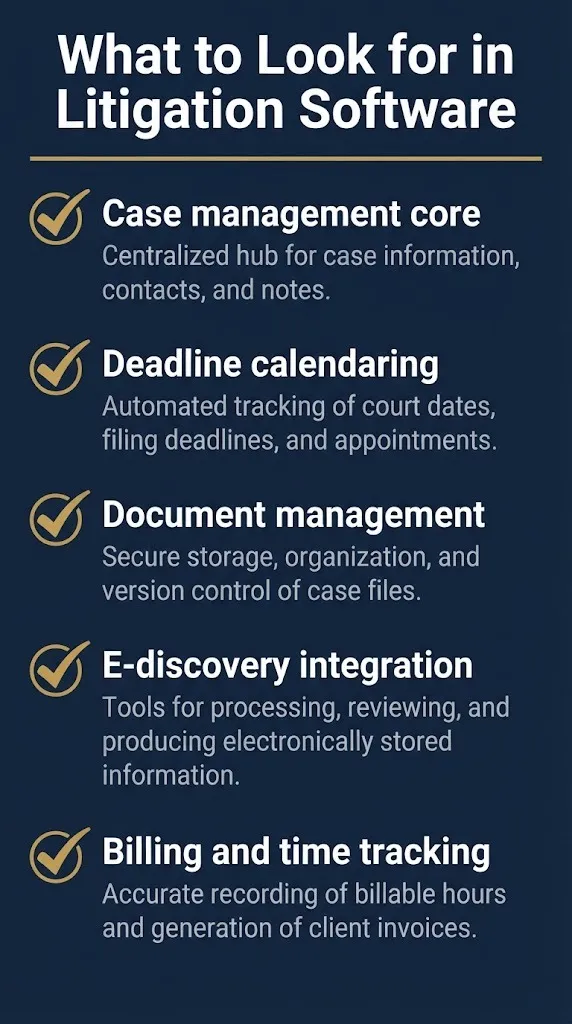
Case management is the foundation. You create matters, assign team members, track contacts, and store case notes. Everything else builds on this.
Calendaring and deadline management prevent malpractice. Court deadlines, statutes of limitations, and filing deadlines live in one place with reminders. Missed deadlines are the most common malpractice claim, and this feature directly addresses that risk.
Document management stores pleadings, discovery, correspondence, and exhibits. Version control, search, and access permissions matter more than pretty folders.
E-discovery integration handles electronic evidence. Some platforms include it. Others integrate with separate e-discovery tools.
Billing and time tracking connect the work to the invoice. Not every litigation platform includes full billing, but most integrate with accounting software.
Key Takeaway: Core features are case management, calendaring, document management, e-discovery, and billing. Everything else is add-on.
Which Litigation Management Software Platforms Lead the Market in 2026?
The market leaders in 2026 are well established. Clio remains the dominant player for small and mid-sized firms. Its litigation-specific features have expanded, and its app marketplace makes it flexible.
MyCase, Smokeball, and PracticePanther compete in the same space. Each has strengths in different areas. MyCase is known for ease of use. Smokeball has strong document automation. PracticePanther is lightweight and fast.
For large firms and corporate legal departments, platforms like Everlaw, Relativity, and Logikcull lead the e-discovery and litigation support space. These are not case management tools in the traditional sense. They handle massive document review, production, and trial preparation.
Filevine, Litify, and CasePeer serve the plaintiff’s firm and mass tort space. They handle high-volume case intake, medical records, and settlement tracking.
The right choice depends on your practice area, case volume, and budget. A solo family lawyer does not need Relativity. A 500-lawyer defense firm does not run on Clio alone.
Key Takeaway: Market leaders include Clio, MyCase, Smokeball, and PracticePanther for small and mid-sized firms, with Everlaw, Relativity, and Logikcull for e-discovery.
How Do AI Features in Litigation Software Actually Work in 2026?
AI features in litigation software fall into three categories. Some are genuinely useful. Some are overhyped. Some are still maturing.
Document review AI identifies relevant documents, flags privileged material, and clusters similar documents. This is the most mature AI application. Tools like Relativity and Everlaw have used machine learning for years, and the accuracy is now good enough for real work.
Legal research AI summarizes case law, drafts memos, and predicts outcomes. The quality has improved dramatically since 2023, but it still requires human review. Lawyers who rely on AI research without checking citations risk embarrassment or sanctions.
Deadline and outcome prediction AI analyzes historical case data to forecast timelines and results. This is the least mature area. The predictions are directional at best and wrong often enough that no court accepts them as evidence.
The honest assessment: AI in litigation software saves time on document review and first drafts. It does not replace judgment, strategy, or courtroom skill.
Key Takeaway: AI is useful for document review and first drafts, but it still requires human review. Prediction tools are not reliable enough to trust blindly.
What Is the Difference Between Case Management and Litigation Management Software?
The terms overlap, but they are not identical. Case management software tracks contacts, matters, tasks, and deadlines for any type of law practice. Litigation management software adds features specific to lawsuits: pleadings, discovery, depositions, exhibits, and trial preparation.
A transactional lawyer needs case management. A litigator needs litigation management. The difference is the discovery and trial workflow.
Many platforms market themselves as both. They have case management features for general practice and litigation modules for dispute work. The better platforms do both well. The worse ones do neither well.
If your practice is exclusively litigation, buy a platform built for litigation. If you mix litigation and transactional work, look for a platform that handles both without forcing you to buy separate modules.
Key Takeaway: Case management is general practice. Litigation management adds discovery, motions, and trial workflow. Know which one you need.
How Do I Choose the Right Litigation Software for My Firm?
Choosing the right platform takes more than a demo and a price quote. Follow these steps.
- List the features you actually need, not the features the vendor shows you.
- Count your active cases and estimate your growth over three years.
- Audit your current workflow and identify the three biggest pain points.
- Shortlist three platforms that match your practice area and case volume.
- Request references from firms your size in your practice area.
- Run a pilot with real cases, not fake demo data.
- Negotiate pricing based on committed users and contract length.
The comparison is like buying a car. The test drive matters more than the brochure. A platform that feels awkward in a pilot will feel worse after six months of daily use.
Key Takeaway: Audit your needs first, pilot with real cases, and talk to references before you sign.
What Are the Most Common Mistakes When Buying Litigation Software?
The most common mistake is buying too many features. Firms overbuy, underuse, and then resent the subscription fee.
Another mistake is ignoring integration. If the platform does not connect to your email, document storage, or accounting system, your team will maintain two systems. That doubles the work.
A third mistake is skipping training. The best software fails if nobody knows how to use it. Budget for training, not just licensing.
A fourth mistake is locking into a long contract before the pilot proves the platform works. Many vendors offer annual contracts. Ask for a shorter pilot or an escape clause.
Key Takeaway: Overbuying, ignoring integration, skipping training, and long contracts before proof are the four mistakes that sink software adoption.
What Does Litigation Software Not Do?
Litigation software does not practice law. It does not make strategic decisions, write persuasive briefs, or read a jury. It organizes information so lawyers can do those things faster.
The software does not replace a good paralegal. It changes what the paralegal does, shifting time from data entry to higher-value work. But a bad workflow plus software equals a faster bad workflow.
It also does not prevent malpractice by itself. Deadlines only matter if someone enters them. The software is a tool, not a safety net.
The honest framing: litigation software amplifies a well-run firm. It does not fix a disorganized one.
Key Takeaway: Software organizes information. It does not make legal judgments, replace staff, or fix broken processes.
How Is the Litigation Software Market Changing in 2026?
The market is consolidating. Larger platforms are acquiring smaller ones. Private equity continues to invest heavily. The result is fewer independent choices and more integrated suites.
AI is the headline feature, but the real change is quieter. Platforms are getting better at integration, automation, and mobile access. The boring stuff matters more than the AI demo.
Pricing is shifting toward subscription models with per-user fees. Some vendors are adding usage-based pricing for AI features. That can surprise firms when the bill arrives.
Data security is a growing concern. Law firms hold sensitive client data, and cloud platforms are targets. Vendors now emphasize security certifications, but firms must still do their own due diligence.
Key Takeaway: Consolidation, AI, subscription pricing, and security concerns define the 2026 market. The boring features matter more than the flashy ones.
What Should a Small Law Firm Look for in Litigation Software?
A small firm needs simplicity, affordability, and integration. The platform must be easy enough that a solo lawyer or a two-person team uses it daily without a dedicated IT staff.
Look for transparent pricing with no hidden per-matter fees. Look for mobile access, because small firm lawyers work from court, home, and everywhere else. Look for document automation, because small firms cannot afford to retype the same motions.
Avoid platforms that require expensive implementation. A small firm should be up and running in days, not months.
Clio, MyCase, and PracticePanther are the usual starting points for small firms. Each offers a free trial or demo, and each has pricing that scales with firm size.
Key Takeaway: Small firms need simplicity, transparent pricing, mobile access, and document automation. Avoid expensive implementation.
What Should a Large Law Firm Look for in Litigation Software?
A large firm needs scale, security, and integration. The platform must handle thousands of matters, hundreds of users, and complex permissions.
Security is non-negotiable. The platform must meet client requirements for data protection, including encryption, access controls, and audit logs. Many corporate clients demand specific security standards.
Integration matters more at scale. The platform must connect to the firm’s existing document management, email, accounting, and e-discovery systems. A disconnected platform creates data silos.
E-discovery capability is essential. Large litigation involves millions of documents. The platform must either handle that volume or integrate with tools that do.
Relativity, Everlaw, and Logikcull are the e-discovery leaders. Case management for large firms often involves custom or enterprise platforms.
Key Takeaway: Large firms need scale, security, integration, and serious e-discovery capability. The platform must meet client security demands.
What Happens Next in Litigation Software?
The next stages are predictable. AI features will continue to improve, especially in document review and first-draft generation. The hype will fade as real usage data emerges.
Consolidation will continue. Expect more acquisitions as private equity firms roll up smaller platforms into larger suites.
Pricing pressure will increase. As AI becomes standard, vendors will look for new ways to charge. Usage-based pricing for AI features will become more common.
Security standards will tighten. Client demands, state bar opinions, and regulatory pressure will push vendors to prove their security, not just claim it.
For buyers, the practical next step is to audit current needs, pilot platforms with real cases, and negotiate contracts with adoption in mind. The best software is the one your team actually uses.
Frequently Asked Questions
What is litigation management software?
Litigation management software helps legal teams track cases, deadlines, documents, discovery, and billing in one system.
How much does litigation software cost?
Most platforms charge $50 to $150 per user per month. Enterprise platforms cost far more.
What is the best litigation management software in 2026?
The best depends on firm size and practice area. Clio, MyCase, Smokeball, and PracticePanther lead for small and mid-sized firms. Relativity and Everlaw lead for e-discovery.
Do I need AI features in litigation software?
AI helps with document review and first drafts, but it is not essential for every firm. Human review remains necessary.
Can litigation software prevent malpractice?
It can reduce missed deadlines if deadlines are entered correctly. It does not replace legal judgment or careful practice.
How long does it take to implement litigation software?
Small firms can implement in days or weeks. Large firms may take months, especially with data migration and training.
What is the difference between case management and litigation management?
Case management tracks matters generally. Litigation management adds discovery, motions, and trial workflow for lawsuits.
Should I buy litigation software or use spreadsheets?
Spreadsheets work for a handful of cases. Beyond that, a real platform saves time and reduces errors.
The single most important step before buying litigation management software is not a demo. It is an honest audit of how your firm currently handles cases, where the pain points are, and what features you will actually use. Software that matches your workflow beats software that impresses in a sales pitch.
Pilot the platform with real cases before you sign a long contract. Talk to references from firms your size. Negotiate pricing based on committed users. The goal is not the most features. It is the system your team uses every day.